Shenzhen Pacific Technology Co.,Ltd

Search
Product
Quality first, customer supreme, crafting high-quality products for the communication industry.
3G SDI Fiber Converter
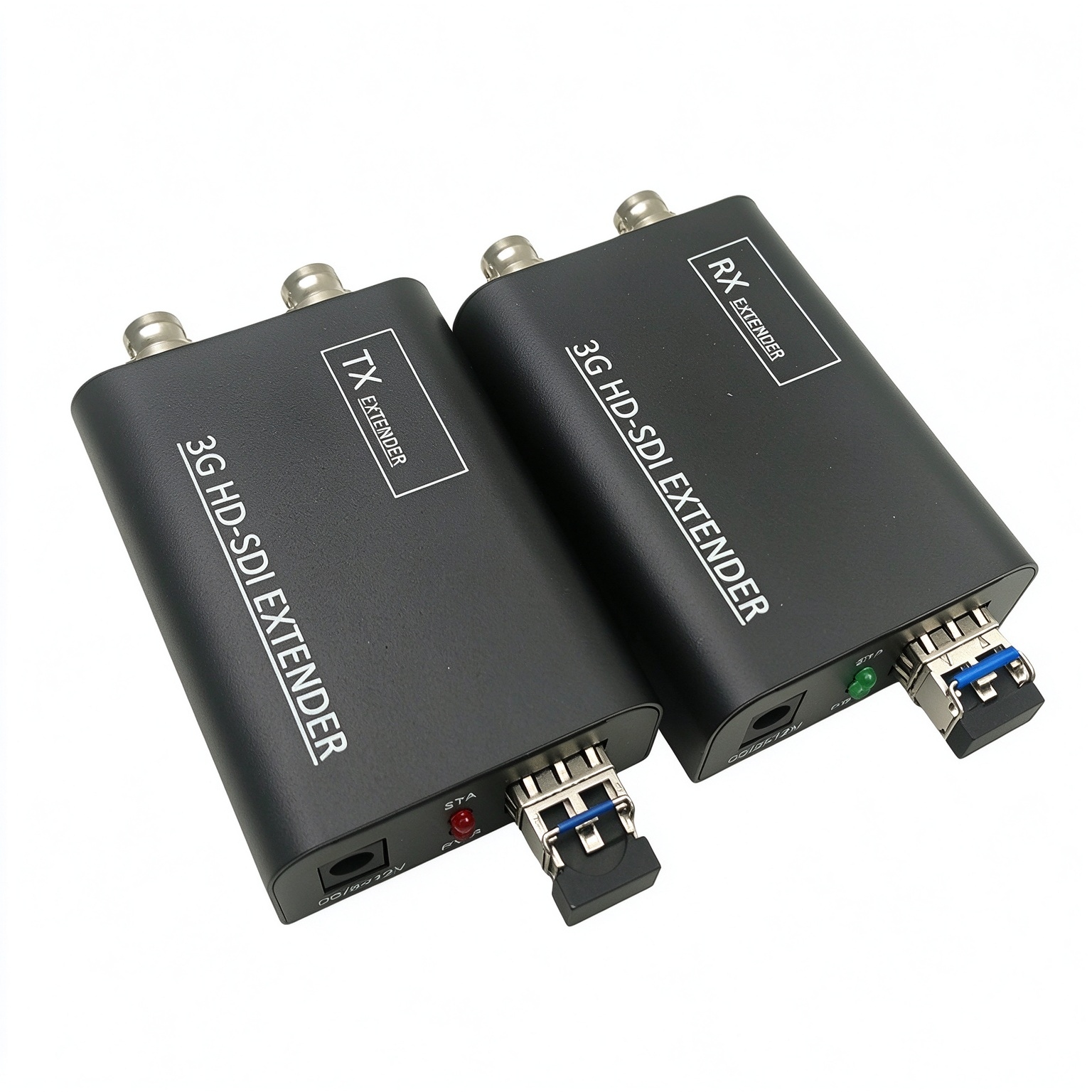
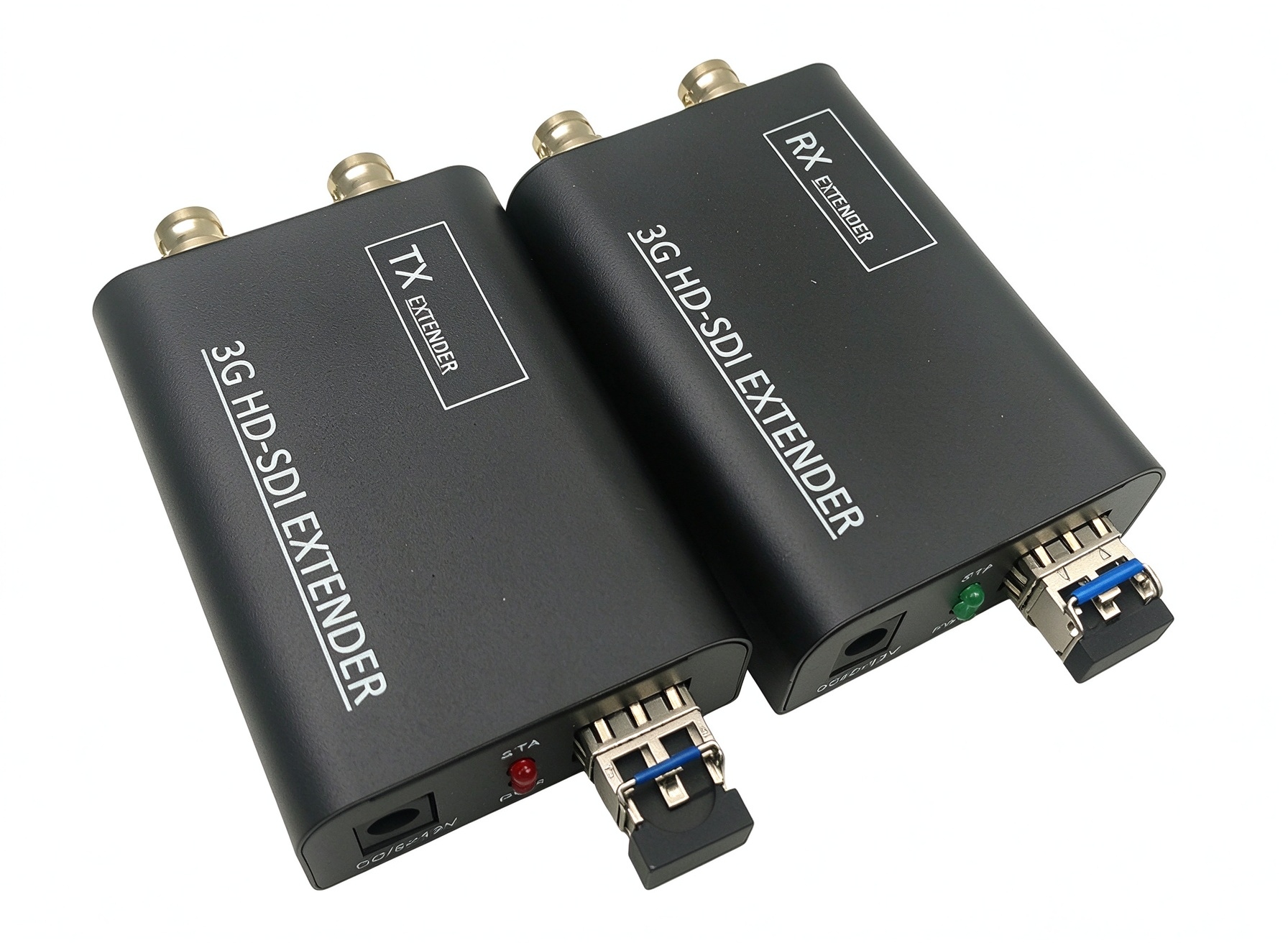
Our M‑SD100 3G/HD‑SDI Fiber Extender is broadcast‑grade SDI over fiber optic transmission kit. It supports 3G‑SDI, HD‑SDI, SD‑SDI signal up to 1080P@60Hz resolution, delivers lossless video together with 8‑channel embedded audio via single‑mode single fiber. Transmission distance ranges from 3KM by default up to 20KM.

This SDI fiber transceiver supports local loop output on transmitter and dual synchronous output on receiver. It auto‑detects PAL / NTSC video formats, supports plug‑and‑play and hot‑swap function. Built‑in automatic image adjustment system and ESD electrostatic protection ensure stable signal performance. Compact metal housing size 82*57*27mm, DC5‑12V power supply.

Perfect solution for TV broadcast studio, outdoor live events, stage performance, video conference and AV system integration. Supplied as one transmitter plus one receiver in a full set
Model:
3G HD‑SDI Fiber Extender | 20KM Single Mode SDI Optical Transceiver

M‑SD100 3G/HD‑SDI Fiber Extender

Introduction

M‑SD100 the fiber extender transmits 3G/HD‑SDI video signals over a long distance through a single fiber cable, and supports 8‑channel embedded audio synchronization function; It can adapt to a variety of complex application environments.

The equipment has excellent image processing and transmission capabilities, making the signal transmission more smooth and stable. It is a reliable, high performance and efficient 3G/HD‑SDI signal extension mode.

Features

  • Long distance transmission of 3G/HD‑SDI video and audio signals through optical fiber, up to 3‑20KM (default 3KM)

  • HD video signal resolution up to 1920*1080P@60Hz

  • Support all digital lossless transmission, 8‑channel embedded audio and video synchronous transmission

  • Support local output, the remote end support two‑way synchronous output

  • Support PAL/NTSC, strong compatibility, able to automatically identify and configure various display modes

  • Support plug and play and hot plug

  • Built‑in automatic adjustment system, make the image smooth, clear and stable

  • Built‑in ESD protection system

  • Simple to install, plug and play

Troubleshooting

  • 1. The red light (PWR) is not bright or the brightness is low, Check whether the power adapter is normal

  • 2. When TX green light (STA) is not on; Check the signal source; The green light stays on indicates regular work.

  • 3. RX green light (STA) is not on, check whether the optical fiber module of the TX contacts normally; The green light (STA) is not on when there is no signal from the TX; Long light indicates that TX and RX work normally.

  • 4. If there is no image on the display, check whether the display selects the correct channel input

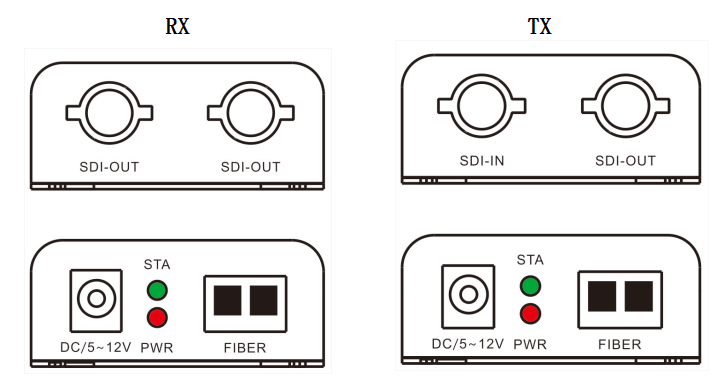
Product Interface Description

image.png

Port nameDescription
SDI IN/OUTSDI signal input/output
FiberFiber Interface(LC)
DC/5~12VPower adapter socket
LED indicatorDescription
PWRunit power indicator
STASDI signal indicator

Specification

CategoryItemDescription
VideoTechnical NormsSMPTE standard
Video bit rateMAX 3.2 GB/Second
InterfaceBNC
Input/output cable specification≤150m(Belden 1694A cable standard)
Video input/output impedance75Ω
Video input / output voltage1Vpp; Min: 0.5Vpp/ Max: 1.5Vpp
Differential gain (10% ~ 90% APL)<1%
SDI resolution625/25 PAL
525/29.97NTSC, 525/23.98 NTSC
720P@50, 720P@59.94
1080i@23/24/30/50/59.94, 1080P@23.98/24/30/50/60

Support SDI specification270Mbps(SD‑SDI), 1.485Gbps/M(HD‑SDI)
SMPTE425M 3Gb/s Mapping(3G‑SDI)
SMPTE424M 3Gb/s serial interface(3G‑SDI)
FiberOptical fiber interfaceLC
Fiber typeSingle mode single fiber
wavelengthSingle mode 1310nm;1550nm
Max transmission distanceDefault: 3KM;Max: 20KM
OtherPowerDC 5~12V/1A
Power ConsumptionMAX 5W
TemperatureOperating temperature: -20℃ ~ +70℃
HumidityOperating humidity: 0 ~ 90%
Mean time between failures≥100000hours
Size82*57*27mm

Installation Process

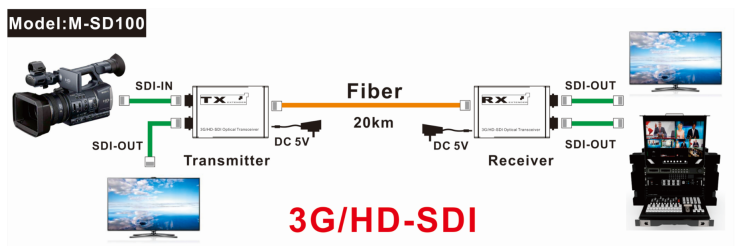
  1. Connect the SDI signal source to the input(SDI IN) of the TX

  2. Connect the RX to the display device (such as SDI matrix, live broadcast, monitor, etc.)

  3. Connect the optical fiber interface between the TX and the RX with single mode fiber cable

  4. Connect the provided DC/5V(12V) power supplies to the power socket of the TX and the RX

Application Diagram

image.png

Package List

  • SDI extender TX   x1pcs

  • SDI extender RX   x1pcs

  • Power adapter x2pcs

  • User manual x1 pcs